










AshburnChange
Organizing events is not only about getting people through the door. For many organizers, there is also a community behind those events — regular attendees, returning participants, association members, or people who want to stay connected with upcoming activities.
That is where Membership on Sulekha Events can help.
Organizers can create memberships, maintain a member database, add members individually or in bulk, and provide special offers to eligible members — all through the Sulekha platform.
Here’s how the feature works and how organizers can get started.
What Can You Do with Sulekha Events Membership?
A membership gives organizers a way to organize their members around their events.
You can create different memberships based on your needs. For example, the PPT shows possibilities such as 2025 Membership, Latest Events Membership, or Upcoming Events Membership.
Once a membership is created, organizers can:
· Add members individually
· Upload members in bulk using an Excel/CSV file
· View, edit, or delete existing members
· Create special member offers
· Apply discounts to selected ticket types
That means the membership feature can become a useful part of managing an ongoing event community rather than something you set up only once.
Step 1: Create Your Membership
Getting started is straightforward.
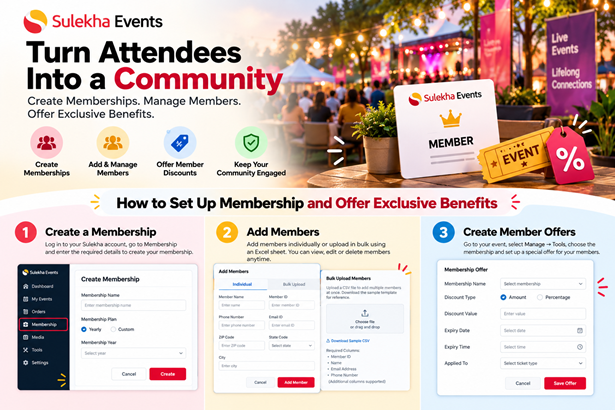
Log in to your Sulekha account and open the Organizer Dashboard. From the left-hand side, select Membership.
You’ll then be asked to enter the basic membership details:
· Membership Name
· Membership Plan — Yearly or Custom
· Membership Year
Once the details are entered, click Create to finalize the membership.
The Membership screen shown in the PPT gives organizers a simple form for entering these details before creating the membership.
Quick tip: If you run different programs or event groups, separate memberships can help you organize them more clearly.
Step 2: Add Your Members
Creating the membership is only the beginning. The next step is adding people to it.
After creating a membership, scroll to the List of Memberships section, select the membership you want to work with, and click Add Members.
Sulekha provides two ways to add members:
Add Members Individually
For smaller groups, you can enter member information manually.
The screen shown in the PPT includes fields such as:
· Member Name
· Member ID
· Phone Number
· Email ID
· ZIP Code
· State Code
· City
Once the details are entered, you can add the member.
Add Members in Bulk
Managing a larger membership list?
Instead of entering every member one by one, organizers can use the Bulk Uploaded option and upload a CSV file.
The screen specifies required columns including Member ID, Name, Email Address, and Phone Number, with additional columns supported as optional fields. A sample CSV can also be downloaded for reference.
That makes the bulk option particularly useful when you're bringing an existing member database into the platform.
Step 3: Keep Your Member List Organized
Once members have been added, the View List option allows organizers to manage the membership database.
From there, organizers can view, edit, or delete existing members.
The membership screen in the PPT also shows actions such as Add Members, View List, and Edit, giving organizers access to the main membership management functions from one place.
So instead of maintaining separate spreadsheets or disconnected lists, organizers can manage the membership information through the Sulekha Events platform.
Step 4: Give Your Members Special Offers
Now comes the interesting part for members.
Organizers can create special offers associated with a membership.
To create one, go to the respective event and select:
Manage ? Tools ? Membership Offers
Then select the relevant membership.
The organizer can choose a discount type:
· Amount
· Percentage
You can then enter the discount value along with the Expiry Date and Expiry Time, and select which ticket type the offer applies to.
The offer screen shown in the PPT also includes settings such as offer usage and the ticket types to which the offer applies.
Once the offer is saved, active members can use it during event payment by entering their Member ID or registered email. According to the guide, the discount automatically applies when the member is active.
From Event Attendees to an Event Community
This is where the membership feature becomes more than just another organizer setting.
An organizer may have people who attend one event today and another event a few weeks or months later. With memberships, those people can be maintained as part of an organized member database, while organizers can also create offers specifically for them.
The workflow is simple:
Create Membership ? Add Members ? Manage Members ? Create Member Offers
And because the membership setup supports both individual entry and bulk upload, organizers can choose the approach that fits the size of their member base.
Ready to Build Your Membership?
Whether you're managing a small group or a larger event community, Sulekha Events provides organizers with a structured way to create memberships, maintain member information, and offer member-specific discounts.
Set up your membership, bring your members together, and give them another reason to stay connected with your events.
Because an event may last for a day — but a community can keep coming back.

 Contest
