















AshburnChange
Plans Changed? Here’s How to Split Your Sulekha Events Tickets
You’ve got your event tickets. The plans are set. Then, suddenly, someone in your group can’t make it—or someone else wants to join.
No need to let that ticket sit unused.
Sulekha Events’ Ticket Split feature lets you split and transfer your tickets to another attendee. And once you know where to find it, the process is quite straightforward.

Here’s a step-by-step look at how it works.
Step 1: The Event Organizer Generates the Tickets
The process begins with the event organizer. Tickets are generated through the Organizer Dashboard attendee tickets section. Once those tickets are issued, they can be split and transferred to other attendees when needed.
For the person holding the tickets, the next step happens through email.
Step 2: Look for Two Emails
Once the tickets are generated, the attendee receives two emails.
One is the order receipt, which contains the ticket or registration information.
The other contains the Split Ticket URL, which takes you to the Ticket Split process.
So, if you're planning to split a ticket, keep an eye out for that Split Ticket email.
Step 3: Open the Ticket Split Page
Use the email address associated with the ticket to log in.
You can access the ticket-splitting process in either of two ways:
· Open the Split Ticket URL from the email.
· Go through the My Tickets page.
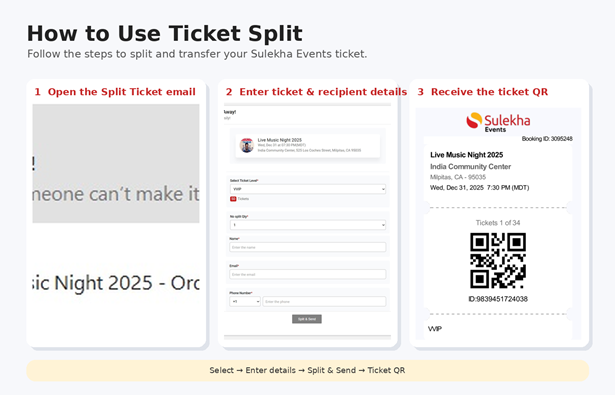
The PPT specifically shows both options for accessing the ticket split process.
Once you're on the Split Tickets page, it's time to enter the details.
Step 4: Choose the Ticket and Recipient
The Split Tickets form lets you select the ticket type and quantity you want to transfer.
Next, enter the recipient's name and email address.
Once everything is entered, click “Split and Send!”
The screen shown in the PPT illustrates this process with fields for selecting the ticket level and quantity, followed by the recipient's details and the Split & Send action.
Step 5: The New Attendee Gets Their Ticket
That's the final part.
After the ticket split is submitted, the second attendee receives a ticket confirmation email containing their Ticket QR in PDF format.
The ticket shown in the PPT includes the event information, venue, date and time, booking details, ticket information, and a QR code that can be used for the event.
From One Ticket Holder to Another—In Just a Few Steps
The entire Ticket Split journey can be summed up simply:
Receive your tickets ? Open the Split Ticket link ? Select the ticket and quantity ? Enter the recipient's details ? Click “Split and Send!” ? The new attendee receives their ticket QR PDF.
So the next time your event plans change, you know exactly what to do.
Instead of wondering what happens to a ticket when someone can't attend, use Ticket Split on Sulekha Events to transfer it to someone who can.
Plans change. The event doesn't have to.

 Contest
