














AshburnChange
Not every guest at an event needs to purchase a ticket.
You may have a sponsor to invite, a partner who helped organize the event, a teammate working behind the scenes, a special guest, or simply a friend you'd like to welcome in.
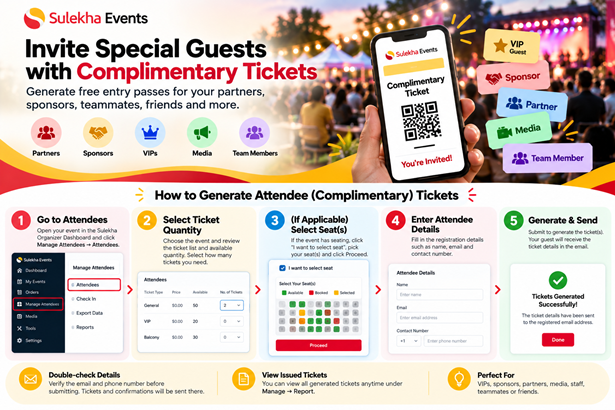
For these situations, Sulekha Events lets organizers generate Attendee (Complimentary) Tickets — free entry passes that can be issued to selected guests while still providing ticket details for entry.
And generating one doesn't have to be complicated.
What Is an Attendee (Complimentary) Ticket?
An Attendee (Complimentary) Ticket is a free entry pass issued by an event organizer without charging the guest.
According to the guide, these tickets can work like regular tickets, including a unique QR code or barcode that can be used for tracking entry at the gate.
They can be useful when inviting:
· Sponsors
· Partners
· VIPs
· Media
· Staff or teammates
· Friends
· Other special guests
So instead of asking these guests to go through the regular ticket-purchase process, organizers can issue their tickets directly.
Where Do You Generate Complimentary Tickets?
Start from the Sulekha Organizer Dashboard.
From there:
Manage Event ? Manage Attendees ? Attendees
The PPT screenshot on page 3 shows the Attendees section with the available ticket types and quantity controls.
That's where the ticket-generation process begins.
How to Generate an Attendee Ticket
Step 1: Choose Your Event
Open the event for which you want to generate complimentary tickets.
Then go to the Attendees section and review the available ticket types and quantities.
Step 2: Select the Ticket Quantity
Choose how many tickets you want to generate.
The quantity selector lets you specify the number of tickets needed for your invitees.
Step 3: Enter the Attendee Details
Enter the guest's:
· Name
· Contact number
These details are important because the generated ticket information will be sent to the email provided.
A small but important check
Before clicking Submit, double-check the email address and phone number.
The guide specifically notes that the ticket/confirmation details are sent to the information entered during registration.
What If the Event Has Seat Selection?
This is where the process gets slightly different.
If the event supports seating, you'll see the option:
“I want to select seat”
Select it, choose the required seat(s), and click Proceed.
Then enter the attendee's name, email, and contact number before submitting the registration.
So the two workflows are essentially:
No Seat Selection
Choose Event ? Select Quantity ? Enter Details ? Submit
With Seat Selection
Choose Event ? Select Quantity ? Select Seat(s) ? Proceed ? Enter Details ? Submit
Nice little distinction, and I think we should make this visually prominent in the blog rather than burying it in the text.
The Ticket Is Sent to the Guest
Once the registration details are submitted, the attendee receives the ticket details at the email address provided during the process.
And organizers don't have to wonder later where those tickets went.
The guide notes that issued tickets can be viewed anytime under:
Manage ? Report
That gives organizers a way to refer back to the tickets they've issued.
A Simple Way to Welcome the People Who Matter
Complimentary tickets can be useful when an event has more than just paying attendees.
A sponsor may need access.
A partner may need an invitation.
A team member may need entry.
A special guest may need a seat.
Instead of treating these invitations as something separate from event ticketing, organizers can generate attendee tickets through the same event management workflow.
Choose the event. Select the tickets. Add the guest details. Submit.
That's it.
Ready to Invite Your Guests?
With Sulekha Events, organizers can generate complimentary attendee tickets for selected guests and send their ticket details directly to the information provided during registration.
Whether you're welcoming a sponsor, partner, VIP, teammate, or friend, you can get their event access organized before the big day.
Because some guests shouldn't have to buy a ticket — they should simply be invited.

 Contest
