































ColumbusChange
How Sulekha Events Makes Ticket Sharing Easy
You’ve booked tickets, made plans with friends, and started looking forward to the event. Then something changes. A friend can’t make it. Someone else suddenly wants to join. Or perhaps you simply need to hand over one or more tickets to another person.
Plans change. Your tickets don’t have to go to waste.
With the Ticket Split feature on Sulekha Events, attendees can share individual tickets with someone else without having to figure out a complicated workaround. The process is designed to make transferring tickets simple, direct, and transparent.
How Does Ticket Split Work?
The process starts with the event organizer. Tickets can be generated through the Organizer Dashboard, including complimentary attendee tickets. Once a ticket is issued, it can later be split and shared with another person.
For the attendee, the next step is straightforward. Two separate emails are sent: an order receipt containing the ticket or purchase details and a Split Ticket URL that takes the attendee directly to the ticket-sharing form.
Two Ways to Split Your Tickets
When you’re ready to share a ticket, Sulekha Events gives you two ways to access the feature.
You can use the Split Ticket URL received in the email, or access the feature through the My Tickets page. You simply need to log in using the same email address to which the ticket was originally issued.
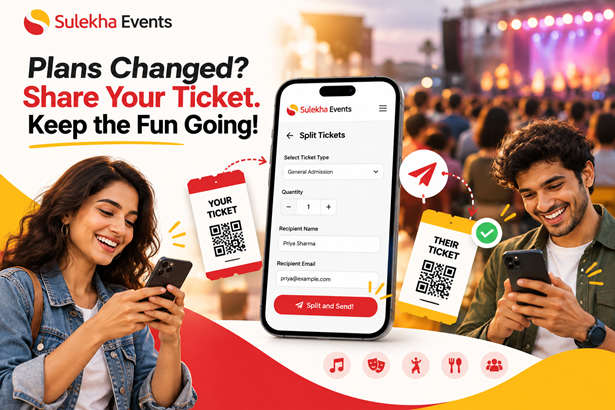
Once you’re inside the Split Tickets form, the process takes just a few steps:
1. Choose the ticket type and quantity you want to share.
2. Enter the recipient’s details, including their name and email.
3. Click “Split and Send!”
The new ticket is then generated and sent to the recipient.
What Happens After You Split a Ticket?
Here’s where the feature becomes particularly useful: the recipient gets their own ticket confirmation email with a Ticket QR code in PDF format.
That ticket is ready to use at the event entrance. It can be saved, printed, or displayed on a phone, and it can be scanned just like other valid tickets during check-in. The PPT also specifies that the ticket is delivered immediately after submission.
The process also provides visibility into the split. The ticket summary shows who received the ticket and what was shared, giving both parties a clear record of the transfer.
Plans Changed? Keep the Event Plans Going
The best part of Ticket Split is that a change in plans doesn't necessarily mean someone has to miss out.
Maybe your friend originally planned to attend but can no longer make it. Maybe another friend wants to join at the last minute. Instead of letting an unused ticket sit in your inbox, you can share it with someone else through the Ticket Split process.
Choose the ticket. Add the recipient. Split and send.
That's it.
With Sulekha Events, the idea is simple: when plans change, keep the fun going.
Ready to Share the Fun?
Whether you're attending a live music night, cultural celebration, community gathering, or another event listed on Sulekha Events, unexpected changes can happen.
The Ticket Split feature gives attendees a simple way to pass along tickets when plans change — while keeping the process clear for both the original attendee and the recipient.
One ticket. A new attendee. Same event. More fun.

 Contest